


Sign envelopes by Marker
With Markers, the same person can sign several envelopes linked to a category in a practical way, with a single confirmation.
Company only (PJ): This feature is not available on the individual account. See the difference in Using Assin as an individual.
For the sender
1. Link the envelopes to the marker (see How to tag an envelope).
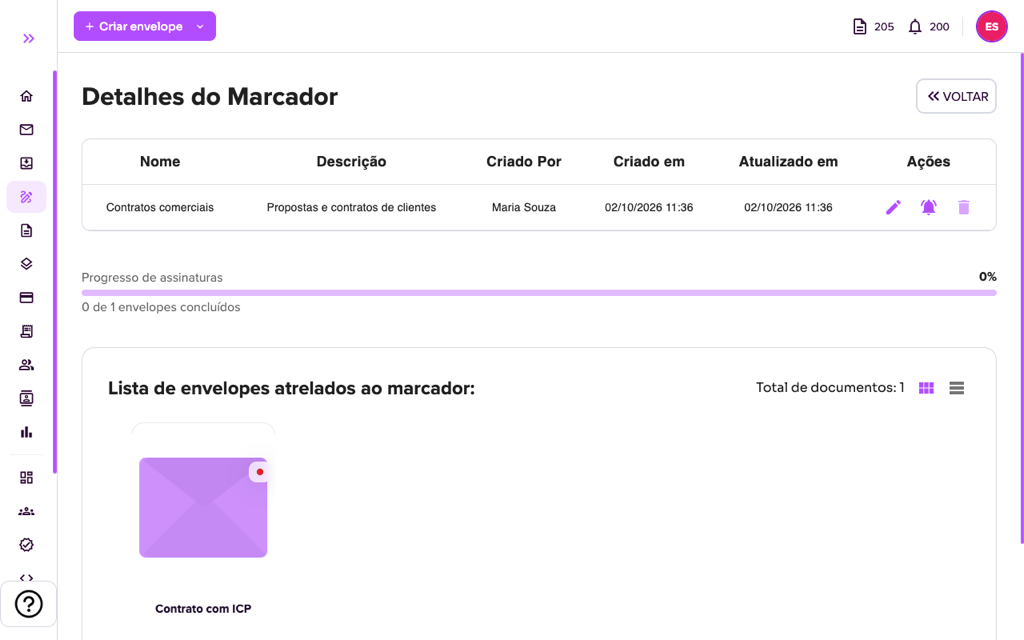
2. In Batch Signing > Markers, open the marker and click the bell icon (“Notify signers to sign in batch”). The signers receive an e-mail with the link to sign.
For the signer
3. When opening the link, the screen shows “You are signing from a marker”: when you confirm at the end, you sign all the documents of all the envelopes of the marker. Each envelope appears in an expandable list, where you can view the documents and check the information.
4. The flow is the same as regular signing (View documents, Confirm data and Conclusion). See How to sign an envelope?.
5. This type of signing asks for access to your location. If the browser blocks it, see How to allow browser location access. At the end “Marker Signing Completed!” appears.
For more information visit our website https://assin.com.br/
See how simple it is, Assin?
Assin Digital Signature
Was this article helpful?
Thanks for your feedback!
Didn't find what you were looking for?
Our team answers Monday to Friday, during business hours. Count on us.