


How to tag an envelope
Markers are categories that allow you to organize your envelopes within the platform.
With them, you can group related documents, making visualization and later signing easier.
You can link a marker at the time of envelope creation.
Follow the instructions below:
1. During the creation of an envelope, you will find the Marker field available in the form.
In this field, all markers already registered in the system will be displayed, including those created by you and by collaborators in your company.
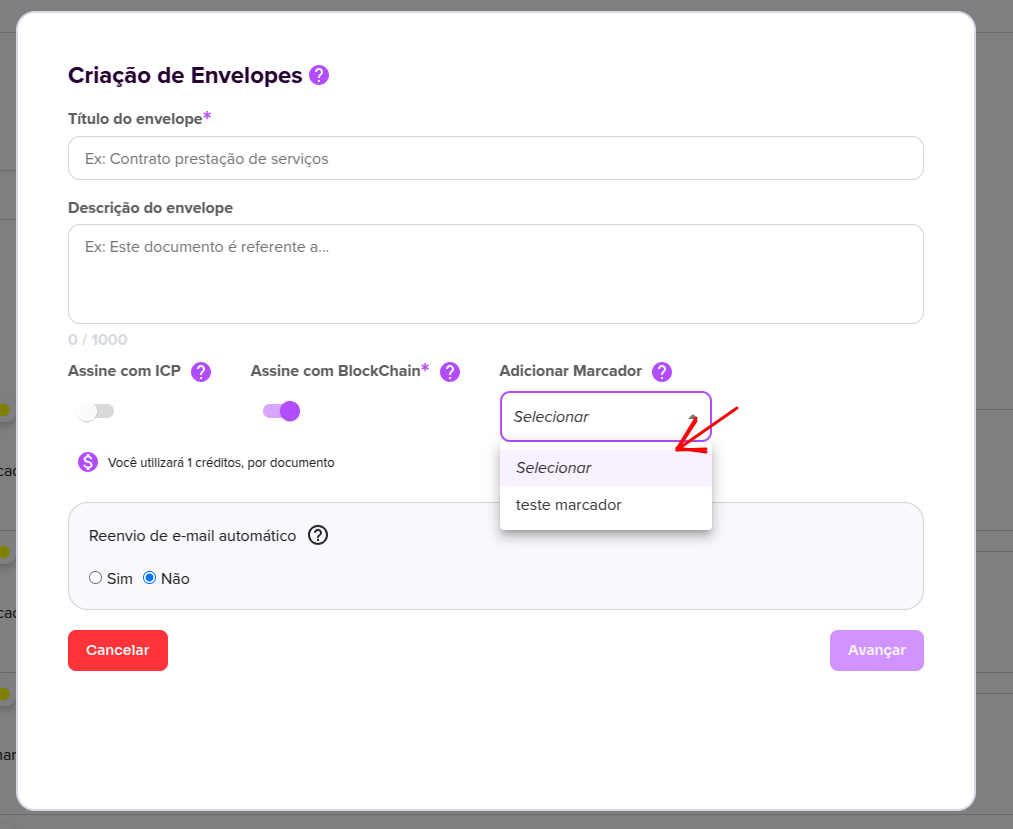
2. If there are no markers registered, the field will not display any options for selection.
3. After selecting the desired marker and completing the normal creation process, once you finalize the envelope, it will automatically be linked to the chosen marker.
4. To view envelopes associated with a marker, access the side menu, click on Batches, and select Sign by marker.
On the screen displayed, you will be able to view the envelope linked to the respective marker.
Now it’s much easier to organize your envelopes using Markers!
For more information, visit our website https://assin.com.br/
See how simple Assin is?
Assin Digital Signature
Was this article helpful?
Thanks for your feedback!