


How to tag an envelope
Markers are categories that organize envelopes inside the platform. With them you group related documents and make joint signing easier. The marker can be linked right when creating the envelope.
Company only (PJ): This feature is not available on the individual account. See the difference in Using Assin as an individual.
1. When creating the envelope, use the Add Marker field of the form. It lists all registered markers, including those created by colleagues in your company. If none exists yet, create one in How to use Markers.
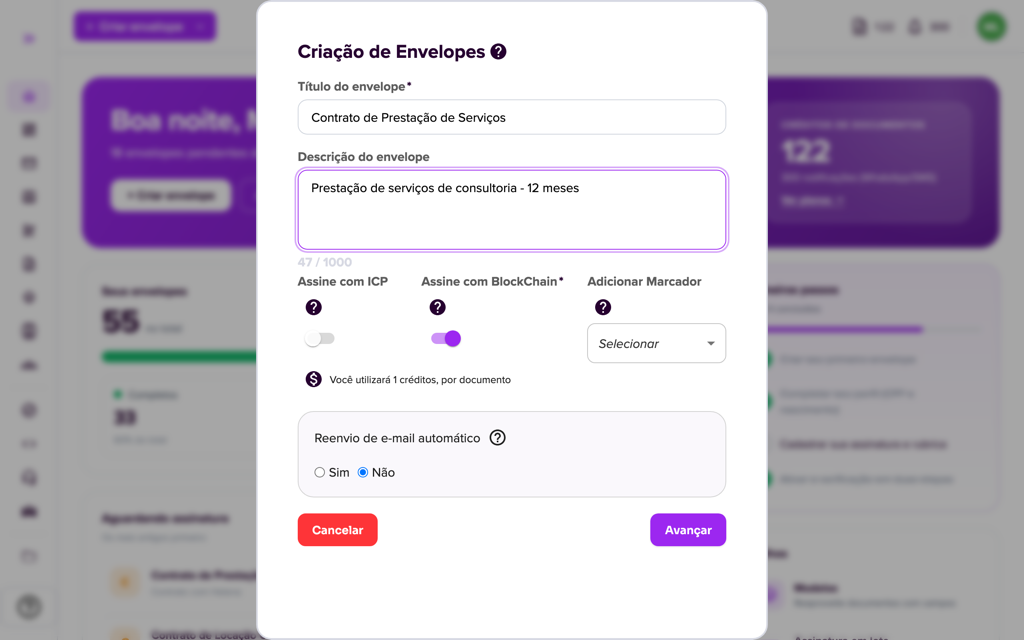
2. Select the marker and complete the creation as usual. The envelope stays linked to the chosen marker.
3. To see the envelopes of a marker, go to Batch Signing > Markers and click the marker. The details screen lists the linked envelopes. See Marker Details.
You can also change the marker later: see How to edit the marker of an envelope.
For more information visit our website https://assin.com.br/
See how simple it is, Assin?
Assin Digital Signature
Was this article helpful?
Thanks for your feedback!
Didn't find what you were looking for?
Our team answers Monday to Friday, during business hours. Count on us.