


How to view and manage documents
The Documents area gathers the files sent to the platform through the interface or the API, including the PDFs generated from templates. It lets you check and reuse documents when creating new envelopes.
Individual and company: on the individual account the Documents item opens My Documents; on the company account it opens Company Documents. See Using Assin as an individual.
Who can see
- Individual: sees their own documents (My Documents screen).
- Regular company collaborator: the screen is called Company Documents, but it lists only the documents they sent themselves.
- Company administrator: sees all company documents, including their own.
Access and search
1. In the side menu, click Documents.
2. By default the documents appear as cards, with the name, size and creation date. With the icons on the right, choose View as table to see, for each document: Identifier, Document name, the User who sent it, Origin (Interface or API), Size and Created at. Scroll the table to the right if a column does not fit on the screen.
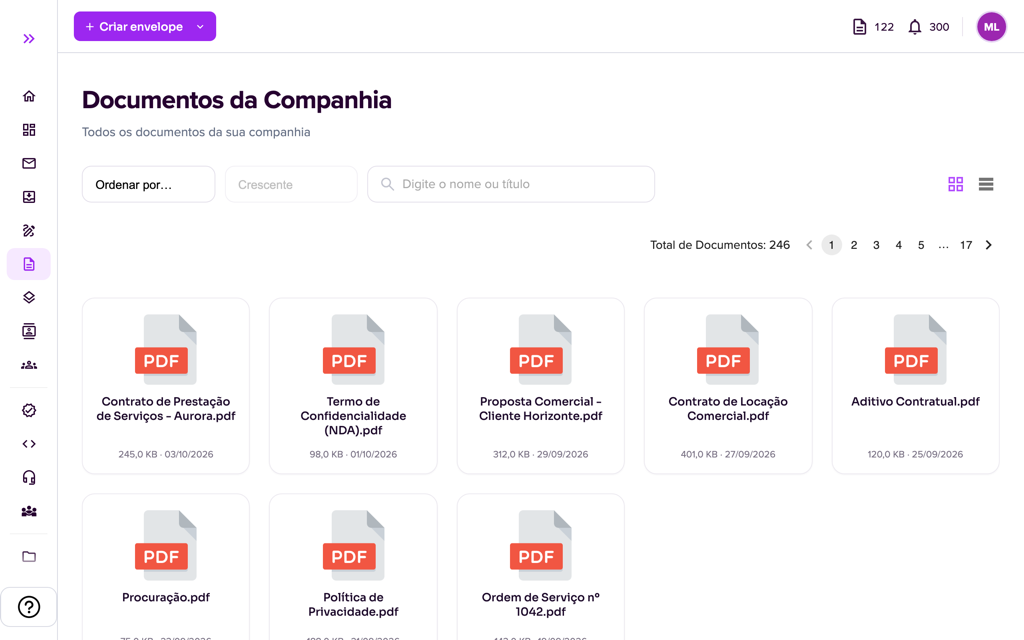
3. Use the search (“Type the name or title”) to find a document and the “Sort by…” field to sort by identifier, name, user, origin, size or creation date, in Ascending or Descending order. The total (“Total Documents”) and the pagination are above the list.
Actions on a document
4. Click a document to open the Document window, with two options:
- View Document: shows the content so you can check it before using it.
- Create Envelope: opens envelope creation with this document already attached. Fill in the data and advance to Envelope Details. See Envelope creation.

Notes
- You only see the documents you have access to.
- Documents can be reused in new envelopes.
- To generate automatically filled documents, see Create templates (in the portal, the menu item is called Modelos).
For more information visit our website https://assin.com.br/
See how simple it is, Assin?
Assin Digital Signature
Was this article helpful?
Thanks for your feedback!
Didn't find what you were looking for?
Our team answers Monday to Friday, during business hours. Count on us.