


Getting to know the Assin platform
Just joined Assin? This tour shows where everything is. Some items only appear according to your profile (individual or company), the permissions you were given and your plan.
Individual or company: some menu items only appear on company accounts (Collaborators, Dashboard, Reports, Batch Signing, Templates, Integrations). See Using Assin as an individual.
Side menu
Click the arrows at the top of the menu to expand or collapse it. The items are:
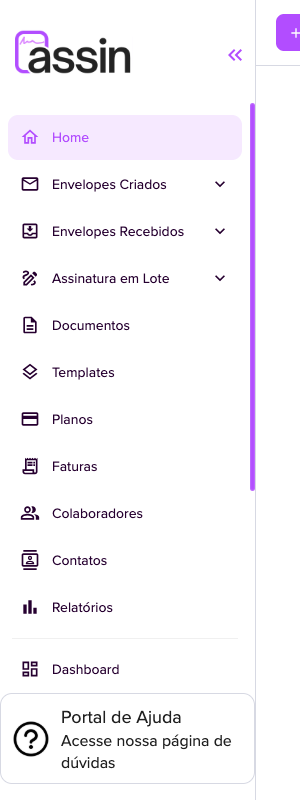
- Home: summary of your envelopes (completed, pending, canceled) and the latest envelopes.
- Created Envelopes: the ones you sent, filtered by status. See Managing your envelopes.
- Received Envelopes: the ones you need to sign or have already signed.
- Batch Signing: Markers and Sent (batches). See Batch signing and How to use Markers.
- Documents: files that went through the platform. See How to view and manage documents.
- Templates: document models. See Create templates.
- Plans and Invoices: see Change plan and Invoices.
- Collaborators: the company team. See Collaborators and permissions.
- Contacts: see Contact Management.
- Reports and Dashboard: see Reports and Company dashboard.
Further down:
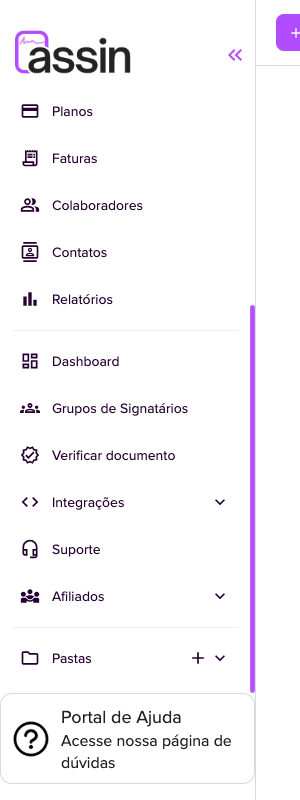
- Signer Groups: see Signer groups.
- Verify document: see Verify the authenticity of a document.
- Integrations (API Keys and Webhook): see API Keys and Webhooks.
- Support: see Support.
- Affiliates: see Affiliate program.
- Folders: see Folders.
- Help Portal: opens this help center.
Top bar

- Create envelope: opens the Full creation and Simple creation (step by step) options. See Envelope creation.
- Document icon (number): your envelope credits. Bell icon (number): your notification credits (WhatsApp and SMS). Hover to see the details. See Credits.
- Your avatar: opens the user menu.
User menu
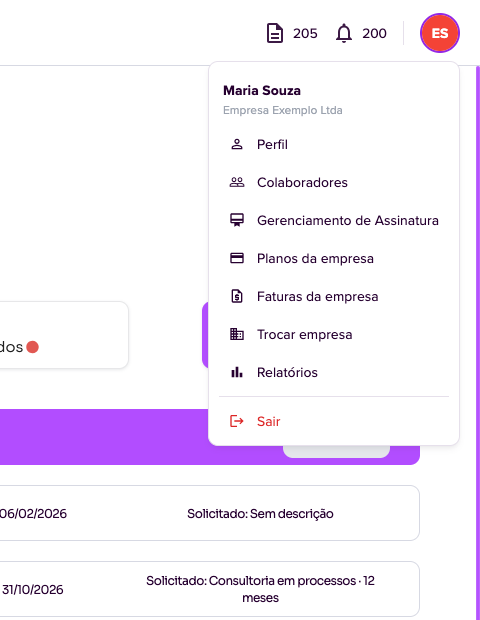
Shows your name and company and gives shortcuts to Profile (see Account security), Collaborators, Subscription Management, Company plans, Company invoices, Switch company (for those who belong to more than one), Reports and Sign out.
For more information visit our website https://assin.com.br/
See how simple it is, Assin?
Assin Digital Signature
Was this article helpful?
Thanks for your feedback!