


How to share the envelope signing link
Now you can share the signing link with the signer directly from the Assin platform, without needing to wait for the signer to receive the email. It is perfect for those moments when you need agility.
To obtain the signing link: 1. Access the “Envelope Details” page in your Assin account.
2. Click on the signer for whom you want to obtain the link.
3. In the window that opens, click the “Copy Link” button.
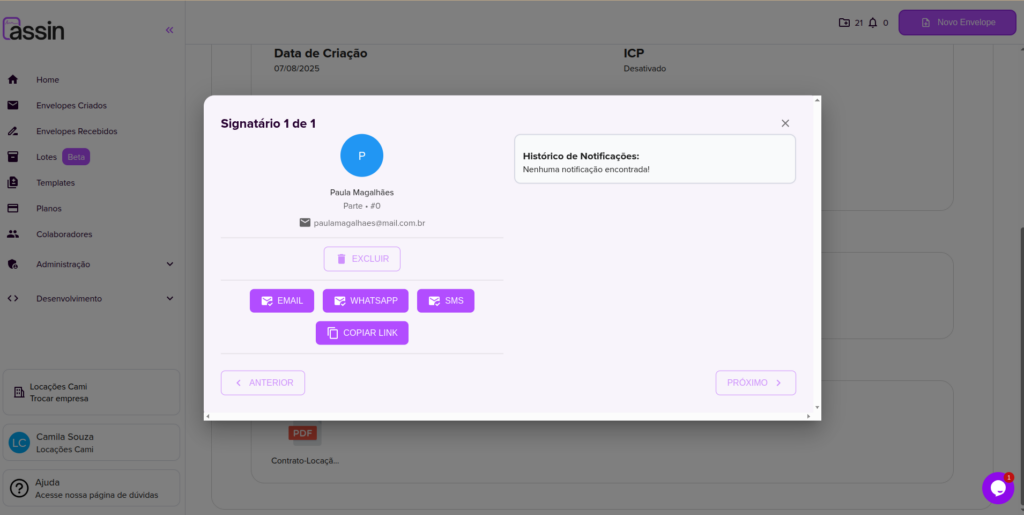
4. You will see a confirmation window. Click “Confirm” and you’re done!
The link will be copied to your clipboard. Now, just paste and share it with the signer.
Important: For your security, when using this feature, email code authentication will be automatically enabled for the signer. This way, they will receive a code via email to confirm their identity before signing. To learn how email validation works, click here.
For more information, visit our site https://assin.com.br/
See how simple Assin is?
Assin Digital Signature
Was this article helpful?
Thanks for your feedback!