


Invoices: billing history
On the Invoices page you have the complete billing history of the account: see the amounts already paid and identify open pending items. To open it, click Invoices in the side menu.
Individual and company: the individual account has Invoices in the side menu and My invoices in the avatar menu. In a company they are the Company invoices, only for managers and administrators. See Using Assin as an individual.
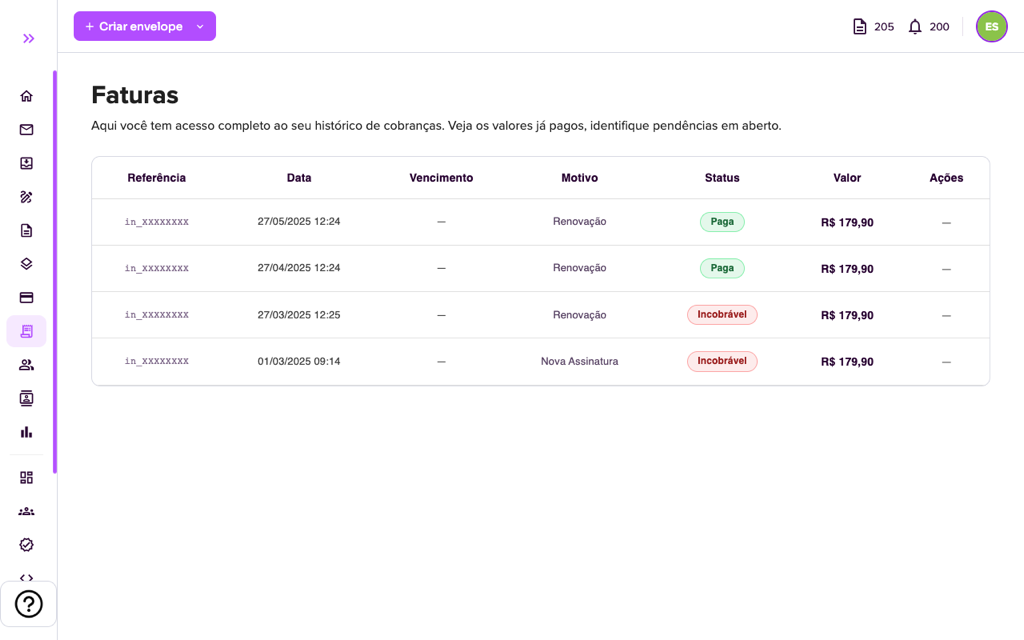
The table shows, for each invoice:
- Reference: the charge code.
- Date and Due date.
- Reason: for example, New Subscription (first charge of the plan) or Renewal.
- Status: Paid when the payment was confirmed, or pending and Uncollectible when the charge could not be processed.
- Amount and Actions (when available, such as opening or paying the invoice).
If a charge was not processed, update the payment method with the payment manager and, if in doubt, open a ticket in Support. To change the plan, see Change plan; to cancel the renewal, see Cancel subscription.
For more information visit our website https://assin.com.br/
See how simple it is, Assin?
Assin Digital Signature
Was this article helpful?
Thanks for your feedback!