


Resend notification
Whenever you seal an envelope, Assin sends an email to the signers. The email informs about the signature request and provides the link to sign. But what if the signer deleted the email with the link before signing? If necessary, you can resend the notification.
Notifications are messages sent to envelope signers and can be made by email, SMS or WhatsApp. They serve to keep the envelope signers updated and informed. When sending notifications, notification credits are consumed. Resending by email is free; to send the notification by SMS or WhatsApp, both options consume 1 credit.
Follow the steps below to resend a notification:
1. Access the Envelope Information page and select the signer you want to notify. You will see a window with that signer’s information. Through this window you can also send new notifications.
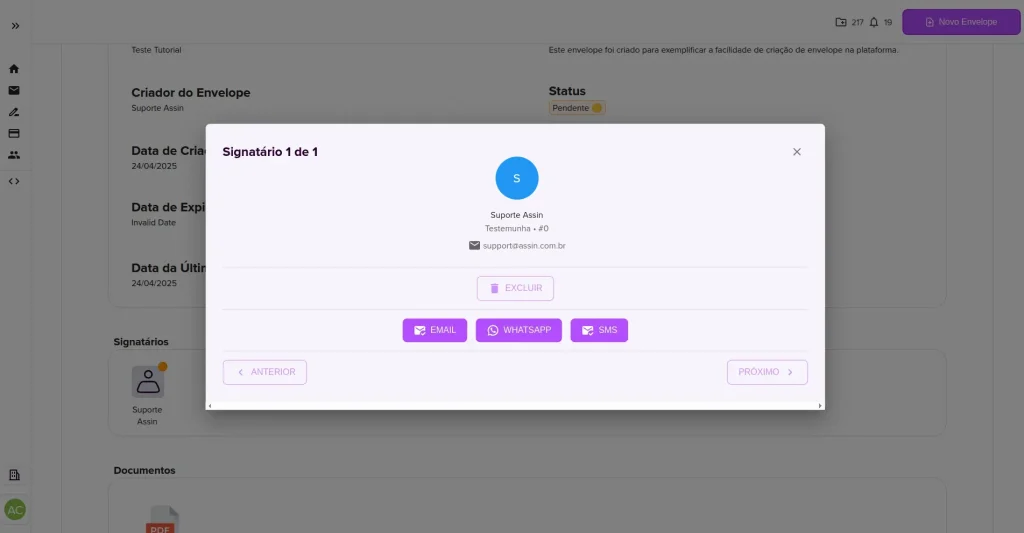
2. Select how you want to notify your signer. You can choose between: email (free), SMS (consumes 1 notification credit) or WhatsApp (consumes 1 notification credit). To learn more about our notification feature, also visit: Difference between Credit and Notification Credit.
3. If you selected SMS or WhatsApp, you will need to add the phone number to send to. And that’s it!
You can send notifications as many times as you want, there is no daily limit. Visit here to learn more about notifications: What is a notification?
For more information, visit our site https://assin.com.br/
See how simple Assin is?
Assin Digital Signature
Was this article helpful?
Thanks for your feedback!