


Signing via WhatsApp and SMS
Assin lets the signer receive the signing link by WhatsApp or SMS, which speeds up the process, especially for people who do not check e-mail often. E-mail remains the default channel, sent automatically when you seal the envelope.
How to send by WhatsApp or SMS
1. Register the signer’s phone number when adding them to the envelope (optional field in the form). Check the number with area code.
2. With the envelope waiting for signature, open the Envelope Details and click the signer.
3. In the signer window, under Resend signature request, click WhatsApp or SMS. If the phone number is not registered yet, the platform asks for it.
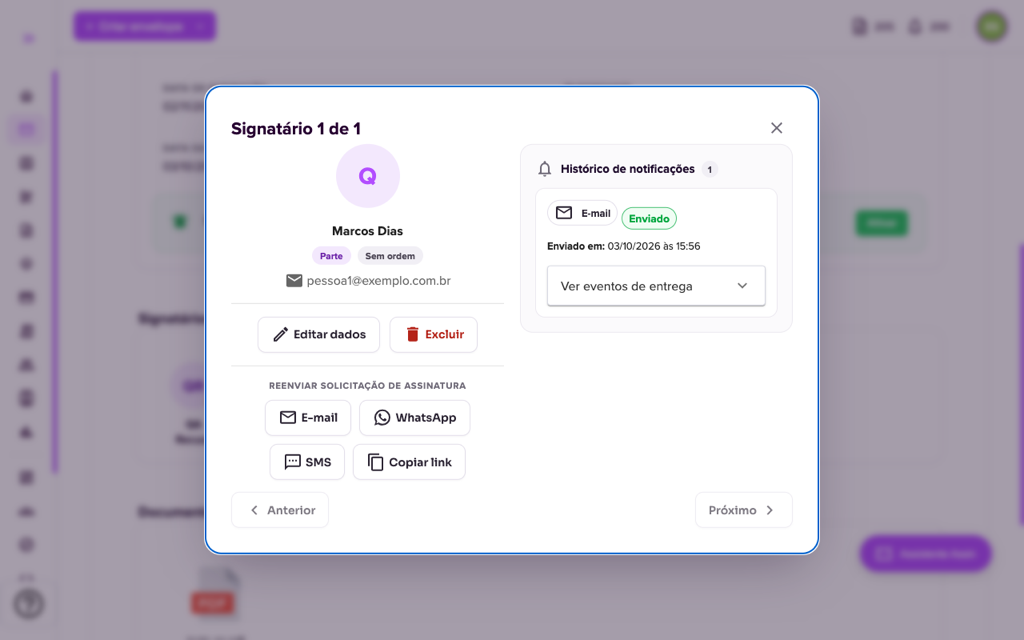
4. The signer receives a message with the access link. The process is the same as by e-mail: they open the link, check the documents and sign. See How to sign an envelope?.
Cost
Sending by WhatsApp and SMS consumes 1 notification credit per message, including resends. Sending by e-mail is free. You see your notification balance on the bell icon in the top bar. To understand the two kinds of credit, see Difference between credit and notification credit, and to buy more, Buy additional credits.
Want to remind the signer from time to time? See Resending notifications.
For more information visit our website https://assin.com.br/
See how simple it is, Assin?
Assin Digital Signature
Was this article helpful?
Thanks for your feedback!