


Using Contacts in the Envelope
When creating or editing an envelope, you can add signatories using contacts previously registered on the platform.
This makes the process faster and avoids manual entry of repeated information.
Select from the contact list
While adding a signatory, you can select an existing contact from your list.
1. On the Envelope Details screen, access the Signatories step.
2. Click on Select from contact list.
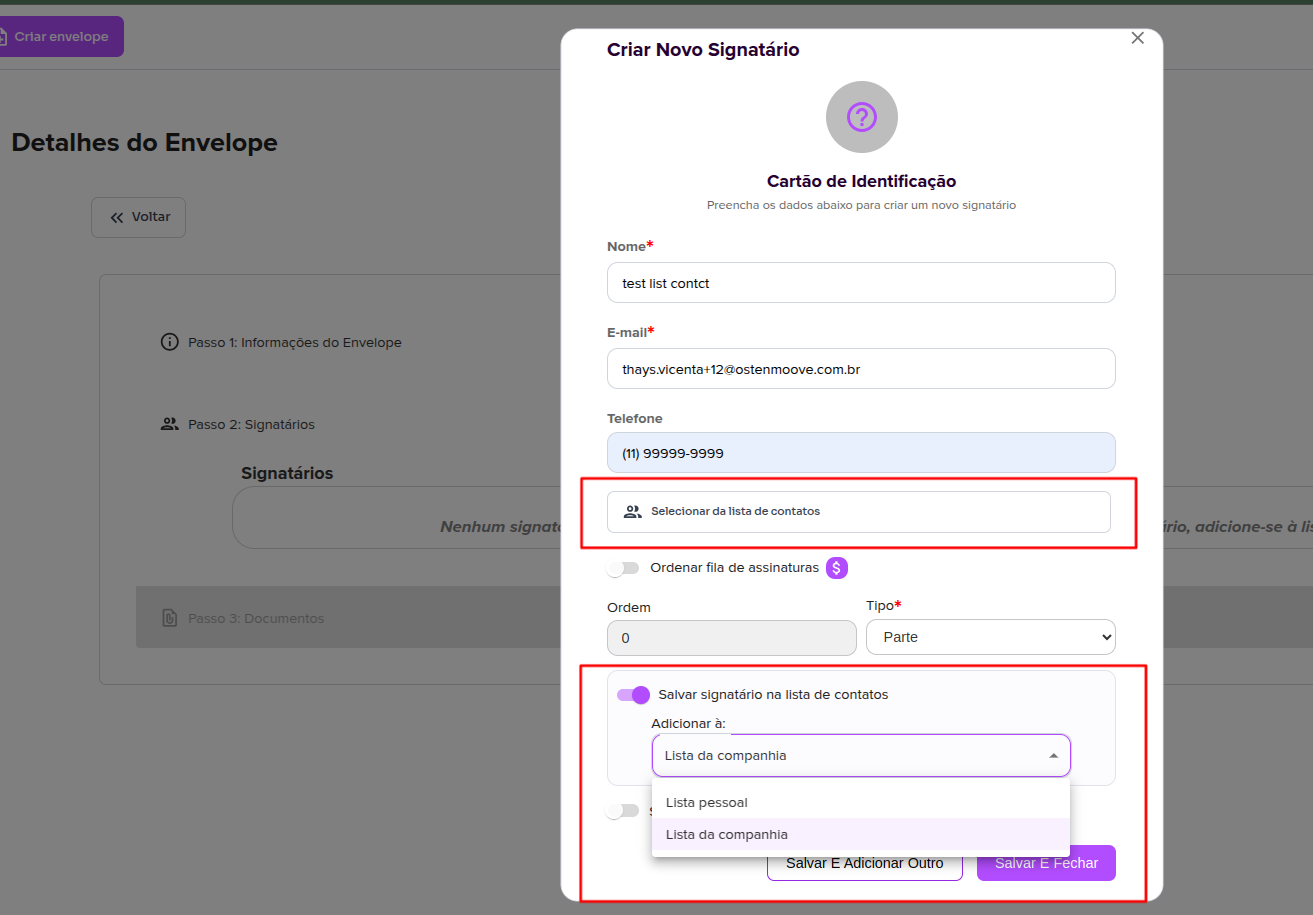
3. Choose the desired contact.
When you select a contact, the data is automatically filled into the form.
Create a new signatory
If the contact does not exist yet, you can fill it in manually:
- Name
- Phone (optional)
After filling in the data, the signatory can be added to the envelope normally.
Save signatory as a contact
While creating the signatory, it is also possible to save this person to your contact list.
Simply activate the option:
Save signatory to contact list
Then choose which list the contact will be saved to:
- Personal list
- Company list (available only for administrators)
This way, this contact can be reused in the future when sending new envelopes.
For more information, visit our website https://assin.com.br/
See how simple Assin is?
Assin Digital Signature
Was this article helpful?
Thanks for your feedback!